오늘 모처럼 KodeKloud 들렸다가
CKS - Challenge 무료 강좌가 있어 들어가 봤습니다.
CKS 는 Certified Kubernetes Security Specialist 로 예전엔 없었지만, 어느새 생겼었고,
마침 그때 사이버먼데이 세일이라 나중에 공부해서 시험봐야지 하며 등록했던게 화근이었네요..
expire 기간 닥쳐서 준비하고 시험봤다가 결국 떨어졌던 기억이 있습니다. ;;
혹시라도 CKS 준비하시는분 있으시면 도움되시라고
- 실습환경 (무료) 링크 : https://kodekloud.com/courses/cks-challenges/
- 문제풀이 : yaml 및 Youtube
올립니다.
현재 강좌는 3/5 개 올라와 있고 4, 5번 문항은 언젠간 올라오겠죠?
저도 시간되면 하나씩 찍어서 올릴 예정입니다~
=============================================
# 여기에서 문제풀때 필요한 내용은
- PVC : PV Bound
- Trivy : Image Scan
- Deployments : PVC + AppArmor
- Service : Deployment
- Network Policy : Egress / Ingress
였습니다.
# YouTube - KodeKloud : CKS - Challenge1 문제풀어가는 동영상 [ https://www.youtube.com/watch?v=m7G-dLUs3WU ]
1. CKS.- Challenge1 문제
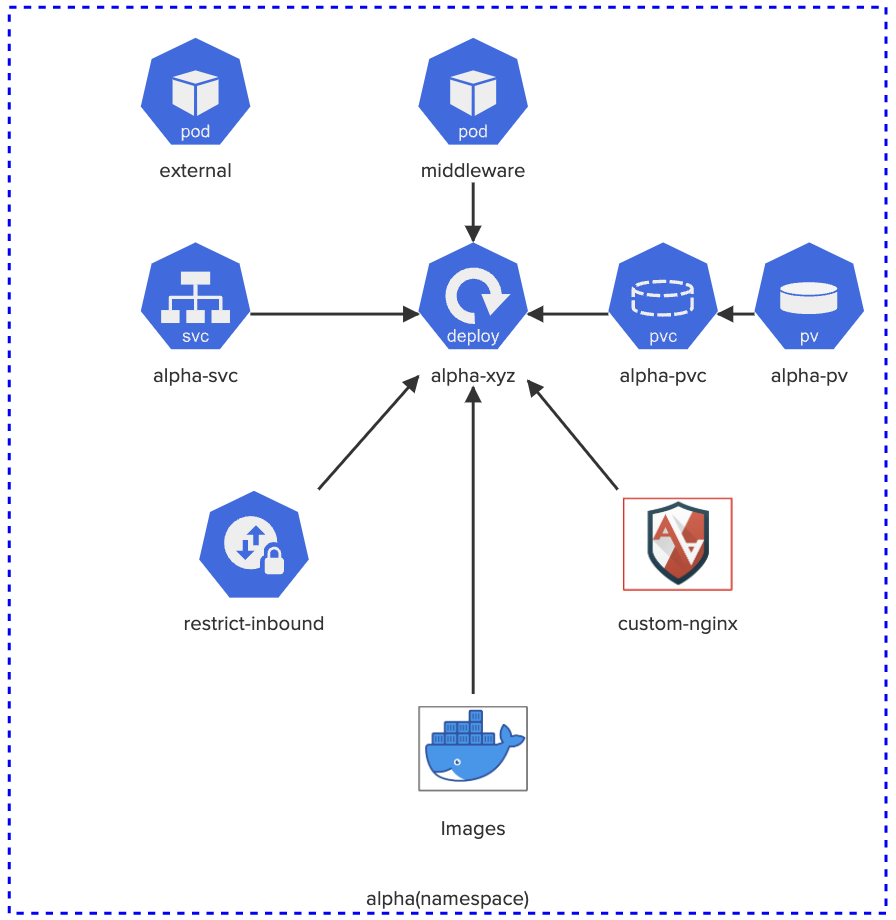
There are 6 images listed in the diagram on the right. Using Aquasec Trivy (which is already installed on the controlplane node), identify the image that has the least number of critical vulnerabilities and use it to deploy the alpha-xyz deployment.
Secure this deployment by enforcing the AppArmor profile called custom-nginx.
Expose this deployment with a NodePort type service and make sure that only incomings connections from the pod called middleware is accepted and everything else is rejected.
Click on each icon to see more details. Once done, click the Check button to test your work.
Click here to see how to submit your solution and win exciting prizes!
=============================================
Yaml 파일 (파일내용은 '더보기' 클릭)
=============================================
# [PersistentVolumeClaim] alpha-pvc.yaml
-------------------------------------------------------------
apiVersion: v1
kind: PersistentVolumeClaim
metadata:
name: alpha-pvc
namespace: alpha
spec:
accessModes:
- ReadWriteMany
resources:
requests:
storage: 1Gi
storageClassName: local-storage
volumeMode: Filesystem
-------------------------------------------------------------
=> PV 에 Bound 되지 않고 Pending 상태였습니다.
# [Service - To Deployment] alpha-svc.yaml
-------------------------------------------------------------
apiVersion: v1
kind: Service
metadata:
labels:
app: alpha-xyz
name: alpha-svc
namespace: alpha
spec:
ports:
- port: 80
protocol: TCP
targetPort: 80
selector:
app: alpha-xyz
type: ClusterIP
-------------------------------------------------------------
=> 보통 생성시는
kubectl expose deploy alpha-xyz --name alpha-svc --port 80 --target-port 80 --type ClusterIP --dry-run client -oyaml > alpha-svc.yaml
형태로 yaml 만드신 후 약간의 수정(NodePort 같은 경우는 지정이 안됨, 과거에는 안됐었는데 최근 kubectl 에서는 될지도.. 안해봄.. ;;)
하면 편해요. (DaemonSet 은 Deploy 만들어서 살짝 변환.. 역시 예전버전에서 없었었음.)
# [Deployments - PVC + AppArmor] alpha-xyz.yaml
-------------------------------------------------------------
apiVersion: apps/v1
kind: Deployment
metadata:
creationTimestamp: null
labels:
app: alpha-xyz
name: alpha-xyz
namespace: alpha
spec:
replicas: 1
selector:
matchLabels:
app: alpha-xyz
strategy: {}
template:
metadata:
creationTimestamp: null
labels:
app: alpha-xyz
annotations:
container.apparmor.security.beta.kubernetes.io/nginx: localhost/custom-nginx
spec:
containers:
- image: nginx:alpine
name: nginx
volumeMounts:
- mountPath: /usr/share/nginx/html
name: data-volume
volumes:
- name: data-volume
persistentVolumeClaim:
claimName: alpha-pvc
-------------------------------------------------------------
=> PersistentVolumeClaim 붙이고, AppArmor 설정 (AppArmor 설정하는걸 까먹었다가 나중에 확인했었네요.. ;;)
# [Network Policy - Egress] expernal-np.yaml
-------------------------------------------------------------
apiVersion: networking.k8s.io/v1
kind: NetworkPolicy
metadata:
name: external-np
namespace: alpha
spec:
podSelector:
matchLabels:
app: external
policyTypes:
- Egress
egress:
- to:
- podSelector:
matchLabels:
app: alpha-xyz
ports:
- protocol: TCP
port: 80
-------------------------------------------------------------
=> Network Policy 의 egress 로 external Pod -> alpha-svc (alpha-xyz Deploy) 로의 연결을 막아요
# [Network Policy - Ingress] restrict-inbound.yaml
-------------------------------------------------------------
apiVersion: networking.k8s.io/v1
kind: NetworkPolicy
metadata:
name: restrict-inbound
namespace: alpha
spec:
podSelector:
matchLabels:
app: alpha-xyz
policyTypes:
- Ingress
ingress:
- from:
- podSelector:
matchLabels:
app: middleware
ports:
- protocol: TCP
port: 80
-------------------------------------------------------------
=> Network Policy 의 ingress 로 middleware Pod -> alpha-svc (alpha-xyz Deploy) 이외의 연결만 허용해요
'Kubernetes' 카테고리의 다른 글
| KodeKloud - CKS Challenge.. May.. Winner.. Thanks.. ^^ (0) | 2022.05.24 |
|---|---|
| KodeKloud : CKS (Certified Kubernetes Security Specialist) - Challenge 4 (0) | 2022.05.08 |
| Secret Env Variable in Container? (0) | 2022.05.02 |
| KodeKloud : CKS (Certified Kubernetes Security Specialist) - Challenge3 (0) | 2022.05.01 |
| KodeKloud : CKS (Certified Kubernetes Security Specialist) - Challenge2 (0) | 2022.04.30 |